







This example shows how to:
- Configure accounts to allow transfer of funds to third party accounts.
- Set a currency type for transactions.
- Create a trust line between the standby account and the operational account.
- Send issued currency between accounts.
- Display account balances for all currencies.
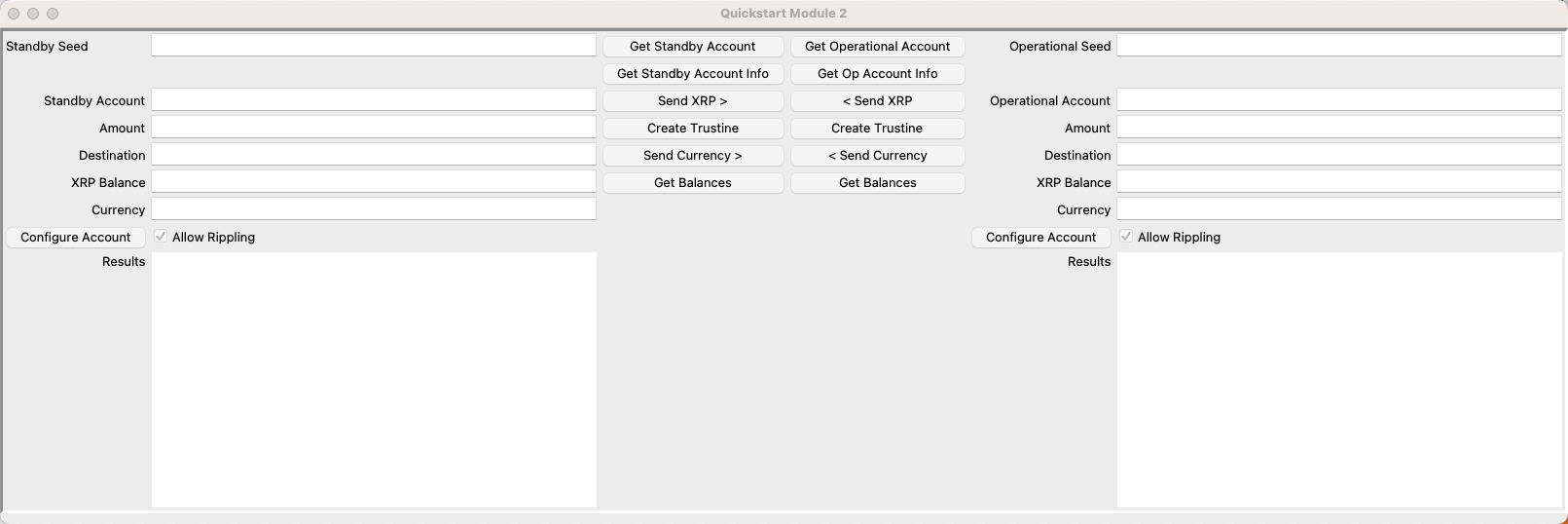
You can download the Quickstart Samples archive to try each of the samples in your own browser.
Open the Quickstart window and get accounts:
- Open and run
lesson2-send-currency.py. - Get test accounts.
- If you have existing account seeds
- Paste account seeds in the Seeds field.
- Click Get Accounts from Seeds.
- If you do not have account seeds:
- Click Get New Standby Account.
- Click Get New Operational Account.
- If you have existing account seeds
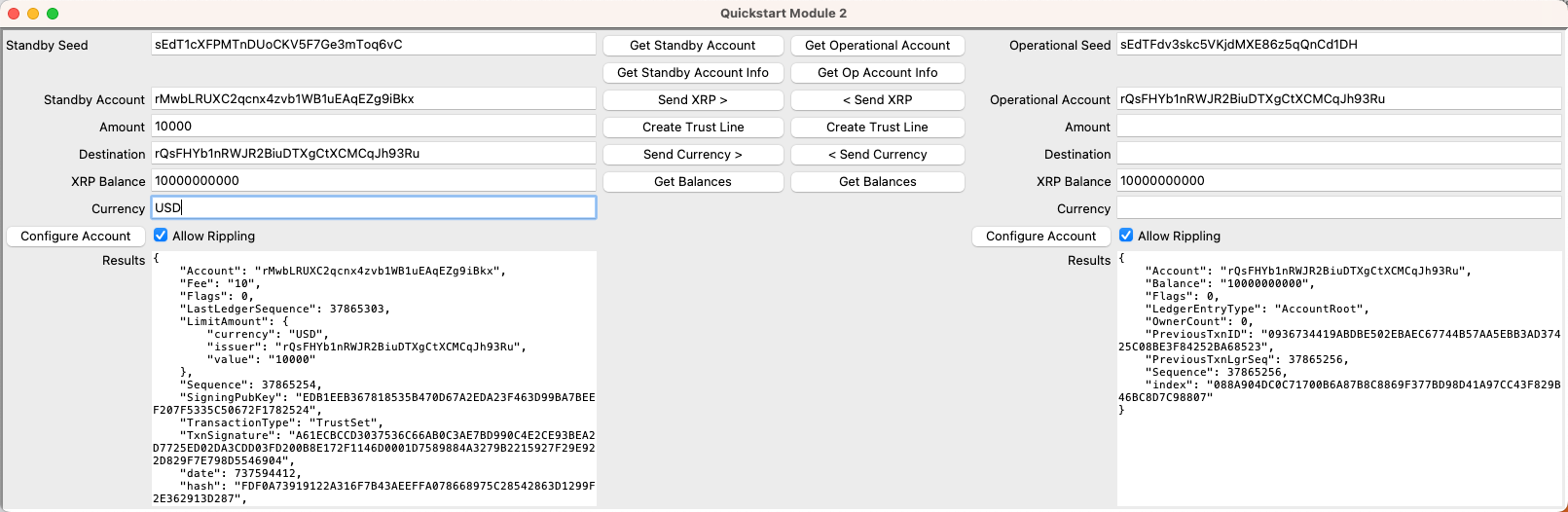
To create a trust line between accounts:
- Enter a currency code in the Currency field.
- Enter the maximum transfer limit in the Amount field.
- Enter the destination account value in the Destination field.
- Click Create Trust Line.
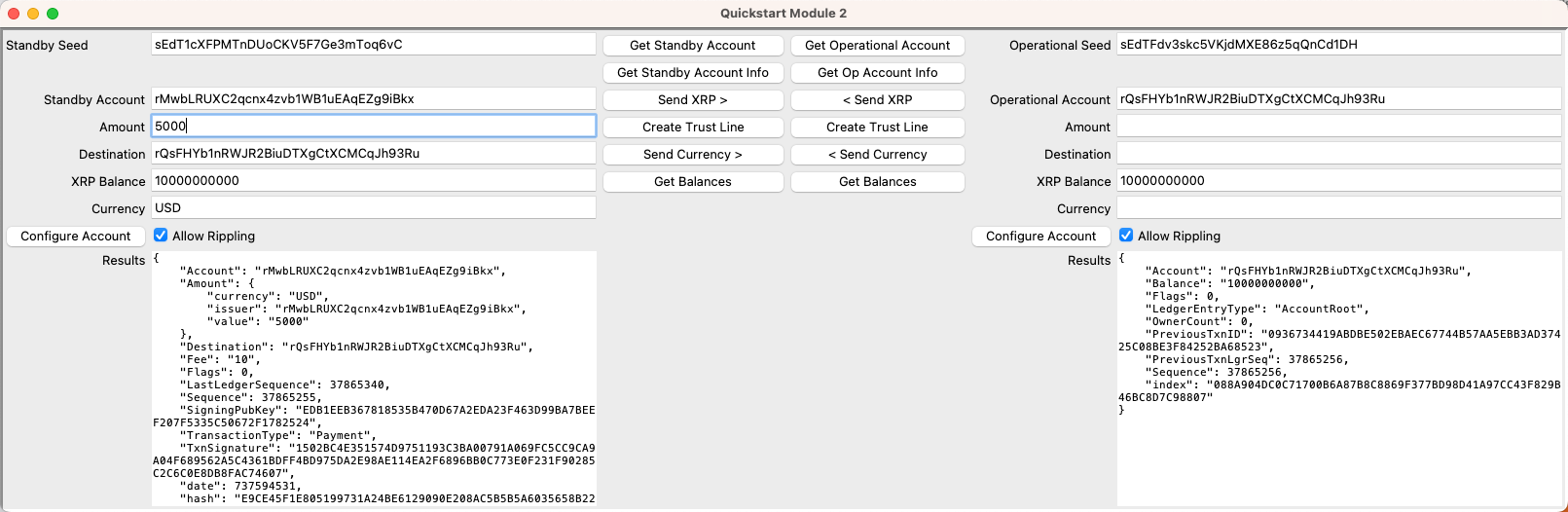
To transfer an issued currency token, once you have created a trust line:
- Enter the Amount.
- Enter the Destination.
- Enter the Currency type.
- Click Send Currency.
When transferring fiat currency, the actual transfer of funds is not simultaneous, as it is with XRP. If currency is transferred to a third party for a different currency, there can be a devaluation of the currency that impacts the originating account. To avoid this situation, this up and down valuation of currency, known as rippling, is not allowed by default. Currency transferred from one account can only be transferred back to the same account. To enable currency transfer to third parties, you need to set the rippleDefault value to true. The Token Test Harness provides a checkbox to enable or disable rippling.
To enable rippling:
- Select the Allow Rippling checkbox.
- Click Configure Account.
Verify the setting by looking for the Set Flag value in the response, which should show a flag setting of 8.

To disable rippling:
- Deselect the Allow Rippling checkbox.
- Click Configure Account.
Verify the setting by looking for the Clear Flag value in the response, which shold show a flag setting of 8.

You can download the Quickstart Samples archive to try each of the samples.
Module 2 provides the logic for creating trust lines and sending issued currency tokens between accounts.
Import dependencies and set the testnet_url.
import xrpl
from xrpl.clients import JsonRpcClient
from xrpl.wallet import Wallet

testnet_url = "https://s.altnet.rippletest.net:51234"Pass the wallet seed, the issuer account, the currency code, and the maximum amount of currency to send.
def create_trust_line(seed, issuer, currency, amount):
    """create_trust_line"""
Get the wallet and a new client instance.
    receiving_wallet = Wallet.from_seed(seed)
    client = JsonRpcClient(testnet_url)
Define the TrustSet transaction.
    trustline_tx=xrpl.models.transactions.TrustSet(
        account=receiving_wallet.address,
        limit_amount=xrpl.models.amounts.IssuedCurrencyAmount(
            currency=currency,
            issuer=issuer,
            value=int(amount)
        )
)The XRP Ledger supports standard 3-character currency codes and non-standard 160-bit hexadecimal currency codes. If the token's currency code is longer than 3 characters, use its 40-character hexadecimal representation in the currency field.
For example:
- USD:
USD - RLUSD:
524C555344000000000000000000000000000000
Submit the transaction to the XRP Ledger.
    response =  xrpl.transaction.submit_and_wait(trustline_tx,
        client, receiving_wallet)
Return the results.
return response.resultSend currency to another account based on the sender wallet, destination account, the currency type, and the amount of the currency.
def send_currency(seed, destination, currency, amount):
    """send_currency"""
Get the sending wallet and a client instance on Testnet.
    sending_wallet=Wallet.from_seed(seed)
    client=JsonRpcClient(testnet_url)
Define the payment transaction. The amount requires further description to identify the type of currency and issuer.
    send_currency_tx=xrpl.models.transactions.Payment(
        account=sending_wallet.address,
        amount=xrpl.models.amounts.IssuedCurrencyAmount(
            currency=currency,
            value=int(amount),
            issuer=sending_wallet.address
        ),
        destination=destination
    )
Submit the transaction and get the response.
    response=xrpl.transaction.submit_and_wait(send_currency_tx, client, sending_wallet)```

Return the results.

```python
return response.resultUpdate the XRP Balance fields and list the balance information for issued currencies in the Results text areas.
def get_balance(sb_account_id, op_account_id):
    """get_balance"""
Connect to the XRP Ledger and instantiate a client.
client=JsonRpcClient(testnet_url)Create the GatewayBalances request.
    balance=xrpl.models.requests.GatewayBalances(
        account=sb_account_id,
        ledger_index="validated",
        hotwallet=[op_account_id]
    )
Return the result.
    response = client.request(balance)
return response.resultThis example shows how to set and clear configuration flags using the AccountSet method. The ASF_DEFAULT_RIPPLE flag is pertinent to experimentation with transfer of issued currencies to third-party accounts, so it is demonstrated here. You can set any of the configuration flags using the same structure, substituting the particular flags you want to set. See AccountSet Flags.
Send the account seed and a Boolean value for whether to enable or disable rippling.
def configure_account(seed, default_setting):
    """configure_account"
Get the account wallet and instantiate a client.
    wallet=Wallet.from_seed(seed)
    client=JsonRpcClient(testnet_url)
If default_setting is true, create a set_flag transaction to enable rippling. If false, create a clear_flag transaction to disable rippling.
    if (default_setting):
        setting_tx=xrpl.models.transactions.AccountSet(
            account=wallet.classic_address,
            set_flag=xrpl.models.transactions.AccountSetAsfFlag.ASF_DEFAULT_RIPPLE
        )
    else:
        setting_tx=xrpl.models.transactions.AccountSet(
            account=wallet.classic_address,
            set_flag=xrpl.models.transactions.AccountSetAsfFlag.ASF_DEFAULT_RIPPLE
        )
Submit the transaction and get results.
    response=xrpl.transaction.submit_and_wait(setting_tx,client,wallet)
return response.result This module builds on lesson1-send-xrp.py. Changes are noted below.
import tkinter as tk
import xrpl
import json
Import methods from mod2.py.
from mod1 import get_account, get_account_info, send_xrp
from mod2 import (
    create_trust_line,
    send_currency,
    get_balance,
    configure_account,
)
Module 2 Handlers.
def standby_create_trust_line():
    results = create_trust_line(ent_standby_seed.get(),
        ent_standby_destination.get(),
        ent_standby_currency.get(),
        ent_standby_amount.get())
    text_standby_results.delete("1.0", tk.END)
    text_standby_results.insert("1.0", json.dumps(results, indent=4))


def standby_send_currency():
    results = send_currency(ent_standby_seed.get(),
        ent_standby_destination.get(),
        ent_standby_currency.get(),
        ent_standby_amount.get())
    text_standby_results.delete("1.0", tk.END)
    text_standby_results.insert("1.0", json.dumps(results, indent=4))


def standby_configure_account():
    results = configure_account(
        ent_standby_seed.get(),
        standbyRippling)
    text_standby_results.delete("1.0", tk.END)
    text_standby_results.insert("1.0", json.dumps(results, indent=4))


def operational_create_trust_line():
    results = create_trust_line(ent_operational_seed.get(),
        ent_operational_destination.get(),
        ent_operational_currency.get(),
        ent_operational_amount.get())
    text_operational_results.delete("1.0", tk.END)
    text_operational_results.insert("1.0", json.dumps(results, indent=4))


def operational_send_currency():
    results = send_currency(ent_operational_seed.get(),
        ent_operational_destination.get(),
        ent_operational_currency.get(),
        ent_operational_amount.get())
    text_operational_results.delete("1.0", tk.END)
    text_operational_results.insert("1.0", json.dumps(results, indent=4))


def operational_configure_account():
    results = configure_account(
        ent_operational_seed.get(),
        operationalRippling)
    text_operational_results.delete("1.0", tk.END)
    text_operational_results.insert("1.0", json.dumps(results, indent=4))


def get_balances():
    results = get_balance(ent_operational_account.get(), ent_standby_account.get())
    text_standby_results.delete("1.0", tk.END)
    text_standby_results.insert("1.0", json.dumps(results, indent=4))
    results = get_balance(ent_standby_account.get(), ent_operational_account.get())
    text_operational_results.delete("1.0", tk.END)
    text_operational_results.insert("1.0", json.dumps(results, indent=4))


# Module 1 Handlers
def get_standby_account():
    new_wallet = get_account(ent_standby_seed.get())
    ent_standby_account.delete(0, tk.END)
    ent_standby_seed.delete(0, tk.END)
    ent_standby_account.insert(0, new_wallet.classic_address)
    ent_standby_seed.insert(0, new_wallet.seed)


def get_standby_account_info():
    accountInfo = get_account_info(ent_standby_account.get())
    ent_standby_balance.delete(0, tk.END)
    ent_standby_balance.insert(0,accountInfo['Balance'])
    text_standby_results.delete("1.0", tk.END)
    text_standby_results.insert("1.0",json.dumps(accountInfo, indent=4))


def standby_send_xrp():
    response = send_xrp(ent_standby_seed.get(),ent_standby_amount.get(),
                       ent_standby_destination.get())
    text_standby_results.delete("1.0", tk.END)
    text_standby_results.insert("1.0",json.dumps(response.result, indent=4))
    get_standby_account_info()
    get_operational_account_info()


def get_operational_account():
    new_wallet = get_account(ent_operational_seed.get())
    ent_operational_account.delete(0, tk.END)
    ent_operational_account.insert(0, new_wallet.classic_address)
    ent_operational_seed.delete(0, tk.END)
    ent_operational_seed.insert(0, new_wallet.seed)


def get_operational_account_info():
    accountInfo = get_account_info(ent_operational_account.get())
    ent_operational_balance.delete(0, tk.END)
    ent_operational_balance.insert(0,accountInfo['Balance'])
    text_operational_results.delete("1.0", tk.END)
    text_operational_results.insert("1.0",json.dumps(accountInfo, indent=4))


def operational_send_xrp():
    response = send_xrp(ent_operational_seed.get(),ent_operational_amount.get(), ent_operational_destination.get())
    text_operational_results.delete("1.0", tk.END)
    text_operational_results.insert("1.0",json.dumps(response.result,indent=4))
    get_standby_account_info()
    get_operational_account_info()

# Create a new window with the title "Quickstart Module 2"

window = tk.Tk()
window.title("Quickstart Module 2")


standbyRippling = tk.BooleanVar()
operationalRippling = tk.BooleanVar()


# Form frame
frm_form = tk.Frame(relief=tk.SUNKEN, borderwidth=3)
frm_form.pack()

# Create the Label and Entry widgets for "Standby Account"
lbl_standy_seed = tk.Label(master=frm_form, text="Standby Seed")
ent_standby_seed = tk.Entry(master=frm_form, width=50)
lbl_standby_account = tk.Label(master=frm_form, text="Standby Account")
ent_standby_account = tk.Entry(master=frm_form, width=50)
lbl_standy_amount = tk.Label(master=frm_form, text="Amount")
ent_standby_amount = tk.Entry(master=frm_form, width=50)
lbl_standby_destination = tk.Label(master=frm_form, text="Destination")
ent_standby_destination = tk.Entry(master=frm_form, width=50)
lbl_standby_balance = tk.Label(master=frm_form, text="XRP Balance")
ent_standby_balance = tk.Entry(master=frm_form, width=50)
Add Currency field.
lbl_standby_currency = tk.Label(master=frm_form, text="Currency")
ent_standby_currency = tk.Entry(master=frm_form, width=50)
Add checkbox to Allow Rippling.
cb_standby_allow_rippling = tk.Checkbutton(master=frm_form, text="Allow Rippling", variable=standbyRippling, onvalue=True, offvalue=False)
lbl_standby_results = tk.Label(master=frm_form,text='Results')
text_standby_results = tk.Text(master=frm_form, height = 20, width = 65)

# Place field in a grid.
lbl_standy_seed.grid(row=0, column=0, sticky="w")
ent_standby_seed.grid(row=0, column=1)
lbl_standby_account.grid(row=2, column=0, sticky="e")
ent_standby_account.grid(row=2, column=1)
lbl_standy_amount.grid(row=3, column=0, sticky="e")
ent_standby_amount.grid(row=3, column=1)
lbl_standby_destination.grid(row=4, column=0, sticky="e")
ent_standby_destination.grid(row=4, column=1)
lbl_standby_balance.grid(row=5, column=0, sticky="e")
ent_standby_balance.grid(row=5, column=1)
Place new UI elements.
lbl_standby_currency.grid(row=6, column=0, sticky="e")
ent_standby_currency.grid(row=6, column=1)
cb_standby_allow_rippling.grid(row=7,column=1, sticky="w")
lbl_standby_results.grid(row=8, column=0, sticky="ne")
text_standby_results.grid(row=8, column=1, sticky="nw")
cb_standby_allow_rippling.select()

###############################################
## Operational Account ########################
###############################################

# Create the Label and Entry widgets for "Operational Account"
lbl_operational_seed = tk.Label(master=frm_form, text="Operational Seed")
ent_operational_seed = tk.Entry(master=frm_form, width=50)
lbl_operational_account = tk.Label(master=frm_form, text="Operational Account")
ent_operational_account = tk.Entry(master=frm_form, width=50)
lbl_operational_amount = tk.Label(master=frm_form, text="Amount")
ent_operational_amount = tk.Entry(master=frm_form, width=50)
lbl_operational_destination = tk.Label(master=frm_form, text="Destination")
ent_operational_destination = tk.Entry(master=frm_form, width=50)
lbl_operational_balance = tk.Label(master=frm_form, text="XRP Balance")
ent_operational_balance = tk.Entry(master=frm_form, width=50)
Add field for Currency and checkbox to Allow Rippling.
lbl_operational_currency = tk.Label(master=frm_form, text="Currency")
ent_operational_currency = tk.Entry(master=frm_form, width=50)
cb_operational_allow_rippling = tk.Checkbutton(master=frm_form, text="Allow Rippling", variable=operationalRippling, onvalue=True, offvalue=False)
lbl_operational_results = tk.Label(master=frm_form,text='Results')
text_operational_results = tk.Text(master=frm_form, height = 20, width = 65)

#Place the widgets in a grid
lbl_operational_seed.grid(row=0, column=4, sticky="e")
ent_operational_seed.grid(row=0, column=5, sticky="w")
lbl_operational_account.grid(row=2,column=4, sticky="e")
ent_operational_account.grid(row=2,column=5, sticky="w")
lbl_operational_amount.grid(row=3, column=4, sticky="e")
ent_operational_amount.grid(row=3, column=5, sticky="w")
lbl_operational_destination.grid(row=4, column=4, sticky="e")
ent_operational_destination.grid(row=4, column=5, sticky="w")
lbl_operational_balance.grid(row=5, column=4, sticky="e")
ent_operational_balance.grid(row=5, column=5, sticky="w")
Add elements to the UI.
lbl_operational_currency.grid(row=6, column=4, sticky="e")
ent_operational_currency.grid(row=6, column=5)
cb_operational_allow_rippling.grid(row=7,column=5, sticky="w")
lbl_operational_results.grid(row=8, column=4, sticky="ne")
text_operational_results.grid(row=8, column=5, sticky="nw")
cb_operational_allow_rippling.select()
Create the Standby Account Buttons.
btn_get_standby_account = tk.Button(master=frm_form, text="Get Standby Account",
                                    command = get_standby_account)
btn_get_standby_account.grid(row=0, column=2, sticky = "nsew")
btn_get_standby_account_info = tk.Button(master=frm_form,
                                         text="Get Standby Account Info",
                                         command = get_standby_account_info)
btn_get_standby_account_info.grid(row=1, column=2, sticky = "nsew")
btn_standby_send_xrp = tk.Button(master=frm_form, text="Send XRP >",
                                 command = standby_send_xrp)
btn_standby_send_xrp.grid(row=2, column = 2, sticky = "nsew")
Add buttons Create Trust Line, Send Currency, Get Balances, and Configure Account.
btn_standby_create_trust_line = tk.Button(master=frm_form,
                                         text="Create Trust Line",
                                         command = standby_create_trust_line)
btn_standby_create_trust_line.grid(row=3, column=2, sticky = "nsew")
btn_standby_send_currency = tk.Button(master=frm_form, text="Send Currency >",
                                      command = standby_send_currency)
btn_standby_send_currency.grid(row=4, column=2, sticky = "nsew")
btn_standby_send_currency = tk.Button(master=frm_form, text="Get Balances",
                                      command = get_balances)
btn_standby_send_currency.grid(row=5, column=2, sticky = "nsew")
btn_standby_configure_account = tk.Button(master=frm_form,
                                          text="Configure Account",
                                          command = standby_configure_account)
btn_standby_configure_account.grid(row=7,column=0, sticky = "nsew")
Create the Operational Account buttons.
btn_get_operational_account = tk.Button(master=frm_form,
                                        text="Get Operational Account",
                                        command = get_operational_account)
btn_get_operational_account.grid(row=0, column=3, sticky = "nsew")
btn_get_op_account_info = tk.Button(master=frm_form, text="Get Op Account Info",
                                    command = get_operational_account_info)
btn_get_op_account_info.grid(row=1, column=3, sticky = "nsew")
btn_op_send_xrp = tk.Button(master=frm_form, text="< Send XRP",
                            command = operational_send_xrp)
btn_op_send_xrp.grid(row=2, column = 3, sticky = "nsew")
Add operational buttons Create Trust Line, Send Currency, Get Balances, and Configure Account.
btn_op_create_trust_line = tk.Button(master=frm_form, text="Create Trust Line",
                                    command = operational_create_trust_line)
btn_op_create_trust_line.grid(row=3, column=3, sticky = "nsew")
btn_op_send_currency = tk.Button(master=frm_form, text="< Send Currency",
                                 command = operational_send_currency)
btn_op_send_currency.grid(row=4, column=3, sticky = "nsew")
btn_op_get_balances = tk.Button(master=frm_form, text="Get Balances",
                                command = get_balances)
btn_op_get_balances.grid(row=5, column=3, sticky = "nsew")
btn_op_configure_account = tk.Button(master=frm_form, text="Configure Account",
                                     command = operational_configure_account)
btn_op_configure_account.grid(row=7,column=4, sticky = "nsew")window.mainloop()