







This example shows how to:
- Create a trust line between two accounts.
- Send issued currency between accounts.
- Display account balances for all currencies.
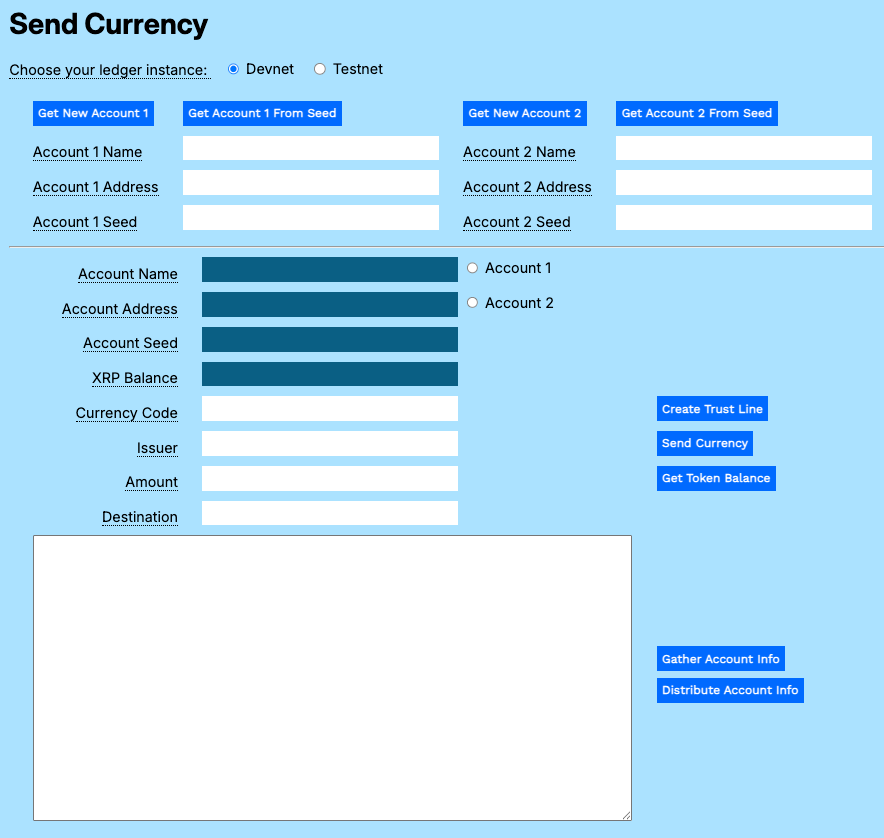
You can download the Payment Modular Tutorials from the source repository for this website.
Open the Send Currency test harness and get accounts:
- Open
send-currency.htmlin a browser. - Get test accounts.
- If you copied the gathered information from another tutorial:
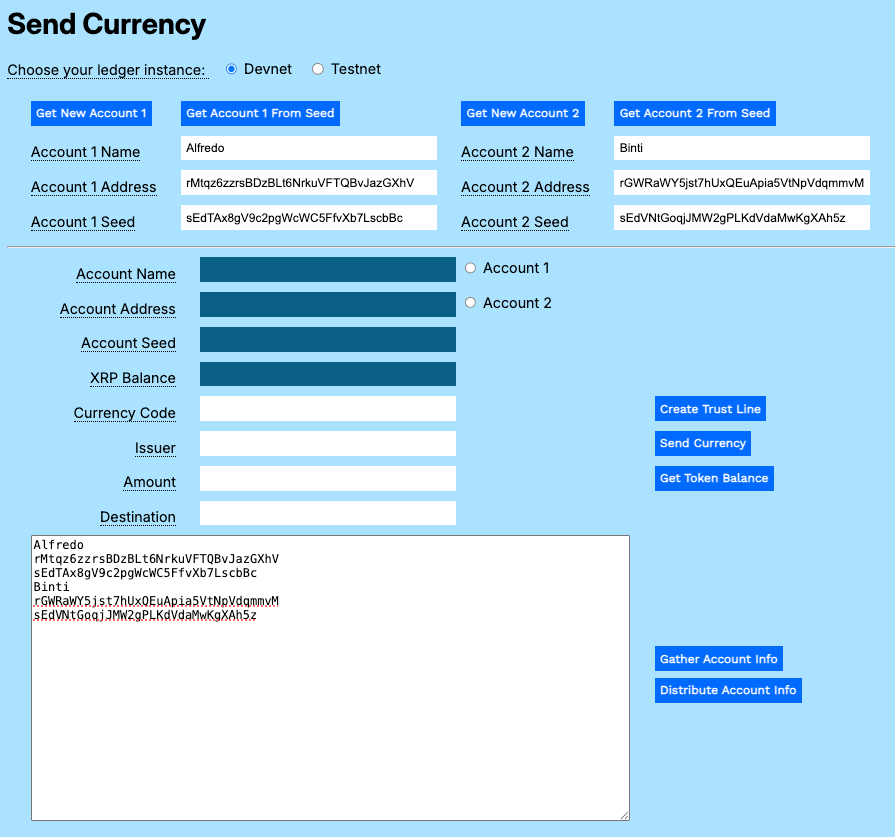
- Paste the gathered information to the Result field.
- Click Distribute Account Info.
- If you have an existing account seed:
- Paste the account seed to the Account 1 Seed or Account 2 Seed field.
- Click Get Account 1 from Seed or Get Account 2 from Seed.
- If you do not have existing accounts:
- Click Get New Account 1.
- Click Get New Account 2.
- If you copied the gathered information from another tutorial:
If you want an account to be able to transfer issued currency to accounts other than the issuer, the issuer account must be configured to allow rippling. See Issuer in the Configuring Accounts topic.
Accounts can always transfer currency tokens back to the original issuer.
In order to trade standard tokens, you must first establish a trust line from the receiving account to the issuing account.
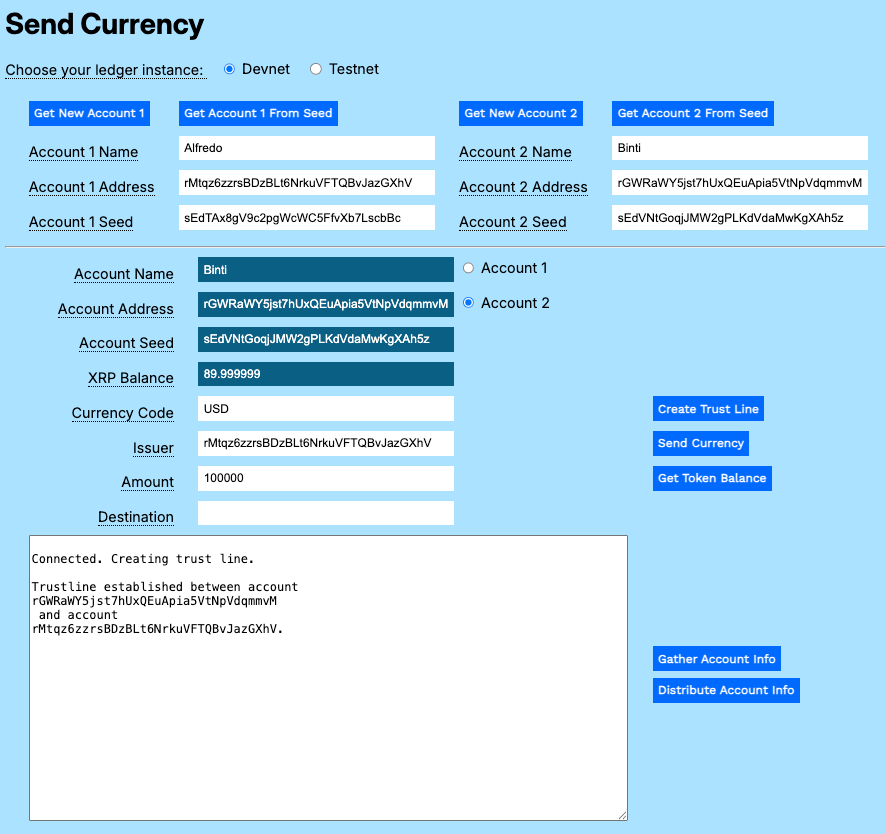
To create a trust line between accounts:
- Click Account 2 to populate the uneditable fields in the form.
- Enter a currency code in the Currency Code field.
- Enter the maximum transfer limit in the Amount field.
- Copy and paste the Account 1 Address value to the Issuer field.
- Click Create Trust Line.
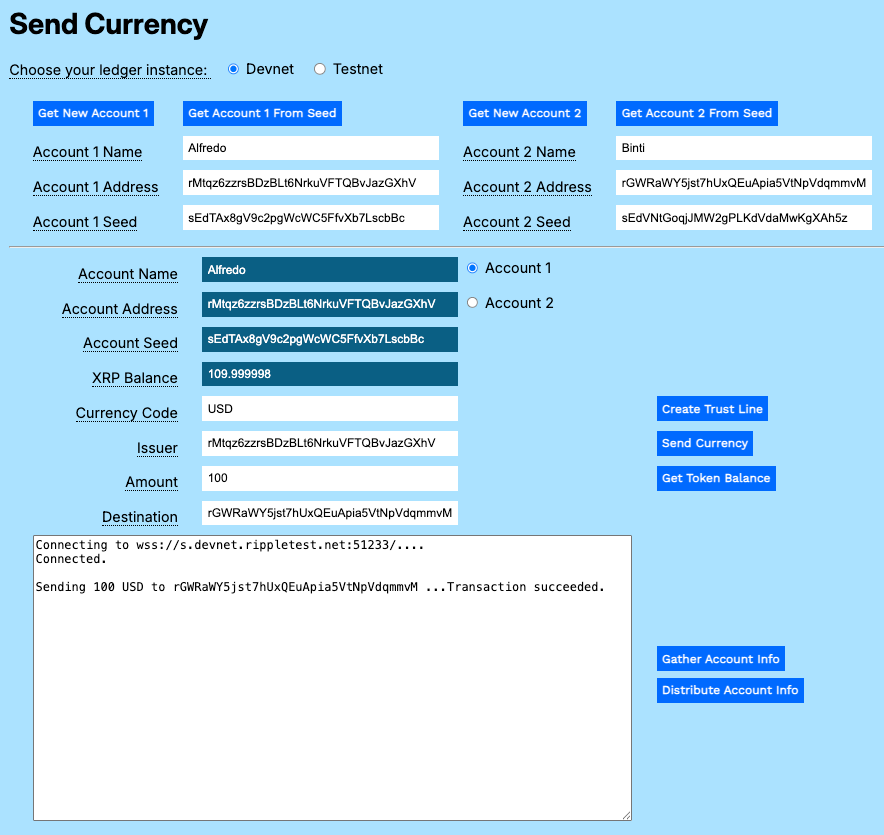
To transfer an issued currency token, once you have created a trust line:
- Click Account 1.
- Enter the Currency Code.
- Copy and paste the Account 1 Address to the Issuer field.
- Enter the Amount of issued currency to send.
- Copy and paste the Account 2 Address to the Destination field.
- Click Send Currency.
To see the balances for all issued tokens for an account.
- Click Account 1 or Account 2.
- Click Get Token Balance.
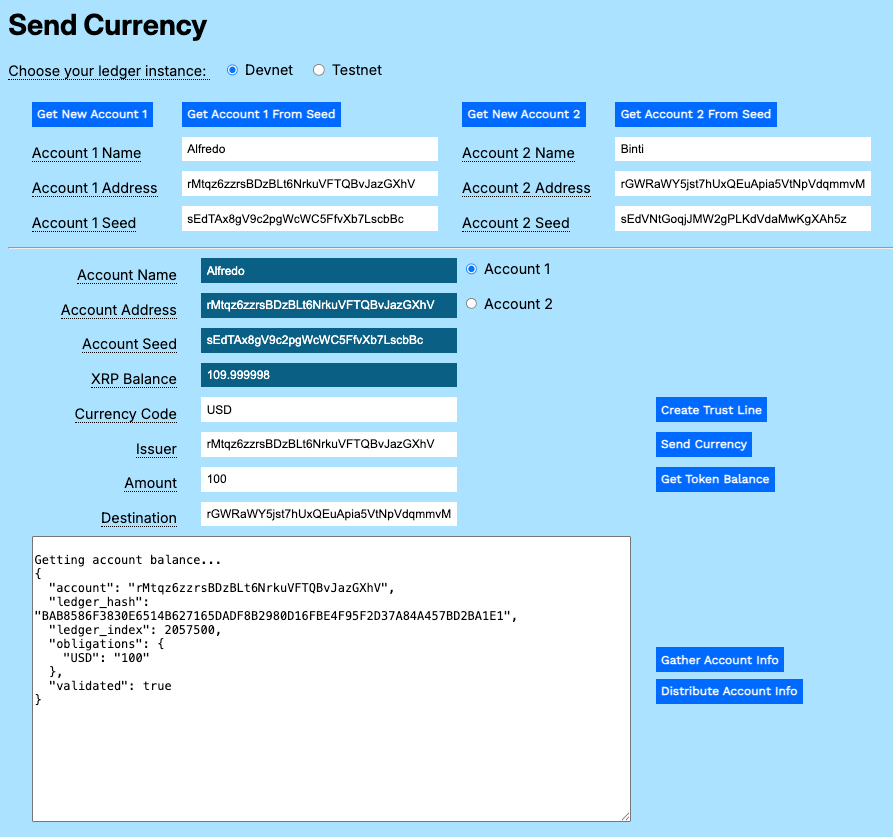
The balance for an issuing account is shown as an obligation.
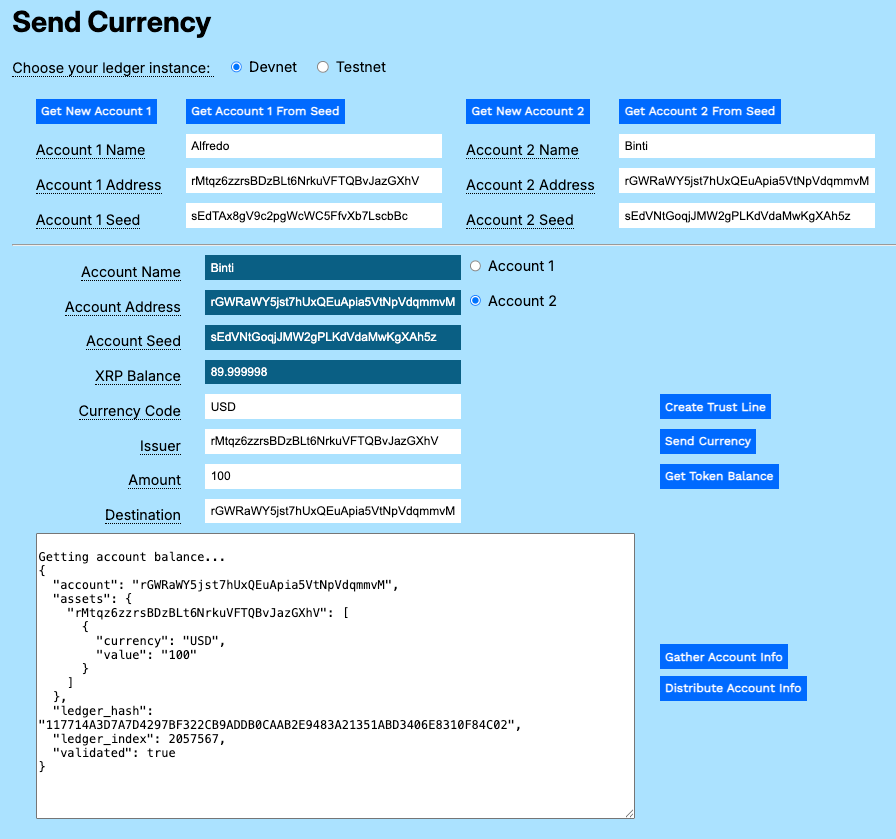
The balance for a holder account is shown as an asset.
You can download the Payment Modular Tutorials from the source repository for this website.
There are two asynchronous functions in the send-currency.js file that build on the base module to add new behavior for sending issued currency between accounts.
A trust line enables two accounts to trade a defined currency up to a set limit. This gives the participants assurance that any exchanges are between known entities at agreed upon maximum amounts.
Connect to the XRPL server.
async function createTrustLine() {
  const net = getNet()
  const client = new xrpl.Client(net)
  await client.connect()
  let results = "\nConnected. Creating trust line.\n"
  resultField.value = results
Create a TrustSet transaction, passing the currency code, issuer account, and the total value the holder is willing to accept.
  try {
    const wallet = xrpl.Wallet.fromSeed(accountSeedField.value)
    const trustSet_tx = {
      "TransactionType": "TrustSet",
      "Account": accountAddressField.value,
      "LimitAmount": {
        "currency": currencyField.value,
        "issuer": issuerField.value,
        "value": amountField.value
      }
    }
Autofill the remaining default transaction parameters.
const ts_prepared = await client.autofill(trustSet_tx)Sign and send the transaction to the XRPL server, then wait for the results.
  const ts_signed = wallet.sign(ts_prepared)
  resultField.value = results
  const ts_result = await client.submitAndWait(ts_signed.tx_blob)
Report the results of the transaction.
    if (ts_result.result.meta.TransactionResult == "tesSUCCESS") {
        results += '\n===Trust line established between account \n' +
        accountAddressField.value + ' \n and account\n' + issuerField.value + '.'
        resultField.value = results
    } else {
        results += `\n===Transaction failed: ${ts_result.result.meta.TransactionResult}`
        resultField.value = results
    }
  }
Catch and report any errors, then disconnect from the XRP Ledger.
  catch (error) {
    console.error('===Error creating trust line:', error);
    results += `\n===Error: ${error.message}\n`
    resultField.value = results
    throw error; // Re-throw the error to be handled by the caller
  }
  finally {
    // Disconnect from the client
    await client.disconnect();
  }
}
//End of createTrustline()This transaction actually sends a transaction that changes balances on both sides of the trust line.
Connect to the XRP Ledger and get the account wallet.
async function sendCurrency() {
  let net = getNet()
  const client = new xrpl.Client(net)
  results = 'Connecting to ' + getNet() + '....'
  resultField.value = results
  await client.connect()
  results += '\nConnected.'
  resultField.value = results
Create a payment transaction to the destination account, specifying the amount using the currency, value, and issuer.
  try {
    const wallet = xrpl.Wallet.fromSeed(accountSeedField.value)
    const send_currency_tx = {
      "TransactionType": "Payment",
      "Account": wallet.address,
      "Amount": {
        "currency": currencyField.value,
        "value": amountField.value,
        "issuer": issuerField.value
      },
      "Destination": destinationField.value
    }
Autofill the remaining default transaction parameters.
const pay_prepared = await client.autofill(send_currency_tx)Sign and send the prepared payment transaction to the XRP Ledger, then await and report the results.
    const pay_signed = wallet.sign(pay_prepared)
    results += `\n\n===Sending ${amountField.value} ${currencyField.value} to ${destinationField.value} ...`
    resultField.value = results
    const pay_result = await client.submitAndWait(pay_signed.tx_blob)
    if (pay_result.result.meta.TransactionResult == "tesSUCCESS") {
        results += '\n===Transaction succeeded.'
        resultField.value = results
    } else {
        results += `\n===Transaction failed: ${pay_result.result.meta.TransactionResult}`
        resultField.value = results
        xrpBalanceField.value = (await client.getXrpBalance(wallet.address))
    }
  }
Update the XRP value field to reflect the transaction fee.
  catch (error) {
    console.error('Error sending transaction:', error);
    results += `\nError: ${error.message}\n`
    resultField.value = results
    throw error; // Re-throw the error to be handled by the caller
  }
  finally {
    // Disconnect from the client
    await client.disconnect();
  }
} // end of sendCurrency()
Update the form to support the new functions.
<html>
<head>
<title>Send Currency</title>
<link href='https://fonts.googleapis.com/css?family=Work Sans' rel='stylesheet'>
<link href="modular-tutorials.css" rel="stylesheet">
<script src='https://unpkg.com/[email protected]/build/xrpl-latest.js'></script>
<script src="account-support.js"></script>
<script src='send-xrp.js'></script>
<script src='send-currency.js'></script>
<script>
if (typeof module !== "undefined") {
const xrpl = require('xrpl')
}
</script>
</head>
<!-- ************************************************************** -->
<!-- ********************** The Form ****************************** -->
<!-- ************************************************************** -->
<body>
<h1>Send Currency</h1>
<form id="theForm">
<span class="tooltip" tooltip-data="Choose the XRPL host server for your account.">
Choose your ledger instance:
</span>
<input type="radio" id="dn" name="server" value="wss://s.devnet.rippletest.net:51233" checked>
<label for="dn">Devnet</label>
<input type="radio" id="tn" name="server" value="wss://s.altnet.rippletest.net:51233">
<label for="tn">Testnet</label>
<br /><br />
<table>
<tr>
<td>
<button type="button" onClick="getNewAccount1()">Get New Account 1</button>
</td>
<td>
<button type="button" onClick="getAccountFromSeed1()">Get Account 1 From Seed</button>
</td>
<td>
<button type="button" onClick="getNewAccount2()">Get New Account 2</button>
</td>
<td>
<button type="button" onClick="getAccountFromSeed2()">Get Account 2 From Seed</button>
</td>
</tr>
<tr>
<td>
<span class="tooltip" tooltip-data="Arbitrary human-readable name for the account."><label for="account1name">Account 1 Name</label>
</span>
</td>
<td>
<input type="text" id="account1name" size="40"></input>
</td>
<td>
<span class="tooltip" tooltip-data="Arbitrary human-readable name for the account.">
<label for="account2name">Account 2 Name</label>
</span>
</td>
<td>
<input type="text" id="account2name" size="40"></input>
</td>
</tr>
<tr>
<td>
<span class="tooltip" tooltip-data="Identifying address for the account.">
<label for="account1address">Account 1 Address</label>
</span>
</td>
<td>
<input type="text" id="account1address" size="40"></input>
</td>
<td>
<span class="tooltip" tooltip-data="Identifying address for the account.">
<label for="account2address">Account 2 Address</label>
</span>
</td>
<td>
<input type="text" id="account2address" size="40"></input>
</td>
</tr>
<tr>
<td>
<span class="tooltip" tooltip-data="Seed for deriving public and private keys for the account.">
<label for="account1seed">Account 1 Seed</label>
</span>
</td>
<td>
<input type="text" id="account1seed" size="40"></input>
</td>
<td>
<span class="tooltip" tooltip-data="Seed for deriving public and private keys for the account.">
<label for="account2seed">Account 2 Seed</label>
</span>
</td>
<td>
<input type="text" id="account2seed" size="40"></input>
</td>
</tr>
</table>
<hr />
<table>
<tr valign="top">
<td align="right">
<span class="tooltip" tooltip-data="Name of the currently selected account.">
<label for="accountNameField">Account Name</label>
</span>
</td>
<td>
<input type="text" id="accountNameField" size="40" readonly></input>
<input type="radio" id="account1" name="accounts" value="account1">
<label for="account1">Account 1</label>
</td>
</tr>
<tr valign="top">
<td align="right">
<span class="tooltip" tooltip-data="Address of the currently selected account.">
<label for="accountAddressField">Account Address</label>
</span>
</td>
<td>
<input type="text" id="accountAddressField" size="40" readonly></input>
<input type="radio" id="account2" name="accounts" value="account2">
<label for="account2">Account 2</label>
</td>
</tr>
<tr valign="top">
<td align="right">
<span class="tooltip" tooltip-data="Seed of the currently selected account.">
<label for="accountSeedField">Account Seed</label>
</span>
</td>
<td>
<input type="text" id="accountSeedField" size="40" readonly></input>
<br>
</td>
</tr>
<tr>
<td align="right">
<span class="tooltip" tooltip-data="XRP balance for the currently selected account.">
<label for="xrpBalanceField">XRP Balance</label>
</span>
</td>
<td>
<input type="text" id="xrpBalanceField" size="40" readonly></input>
</td>
</tr>
<tr>
<td align="right">
<span class="tooltip" tooltip-data="Currency code for the trust line.">
<lable for="currencyField">Currency Code</lable>
</span>
</td>
<td>
<input type="text" id="currencyField" size="40"></input>
<br>
</td>
<td>
<button type="button" onClick="createTrustLine()">Create Trust Line</button>
</td>
</tr>
<tr>
<td align="right">
<span class="tooltip" tooltip-data="Issuing account for the currency.">
<lable for="issuerField">Issuer</lable>
</span>
</td>
<td>
<input type="text" id="issuerField" size="40"></input>
<br>
</td>
<td>
<button type="button" onClick="sendCurrency()">Send Currency</button>
</td>
</tr>
<tr>
<td align="right">
<span class="tooltip" tooltip-data="Amount of XRP to send.">
<label for="amountField">Amount</label>
</span>
</td>
<td>
<input type="text" id="amountField" size="40"></input>
<br>
</td>
<td align="left" valign="top">
<button type="button" onClick="getTokenBalance()">Get Token Balance</button>
</td>
</tr>
<tr>
<td align="right">
<span class="tooltip" tooltip-data="Destination account address where XRP is sent.">
<lable for="destinationField">Destination</lable>
</span>
</td>
<td>
<input type="text" id="destinationField" size="40"></input>
<br>
</td>
</tr>
<tr>
<td colspan="2">
<p align="right">
<textarea id="resultField" cols="80" rows="20"></textarea>
</p>
</td>
<td align="left" valign="top">
<button type="button" onClick="gatherAccountInfo()">Gather Account Info</button><br/>
<button type="button" onClick="distributeAccountInfo()">Distribute Account Info</button>
</td>
</tr>
</table>
</form>
</body>
<script>
const radioButtons = document.querySelectorAll('input[type="radio"]');
radioButtons.forEach(radio => {
radio.addEventListener('change', function() {
if (this.value === 'account1') {
populate1()
} else if (this.value === 'account2') {
populate2()
}
});
});
</script>
</html>